Upcoming Due report
i. Group by Immunization
- On selecting the Upcoming Due report, selecting future date (Immunization due as of this date) and choosing the group by option either as Immunization or as Staff, this report can be generated. (Figure 25)
- This report lists with the immunization name and the respective dosage info and the count of staff who has their Upcoming due.
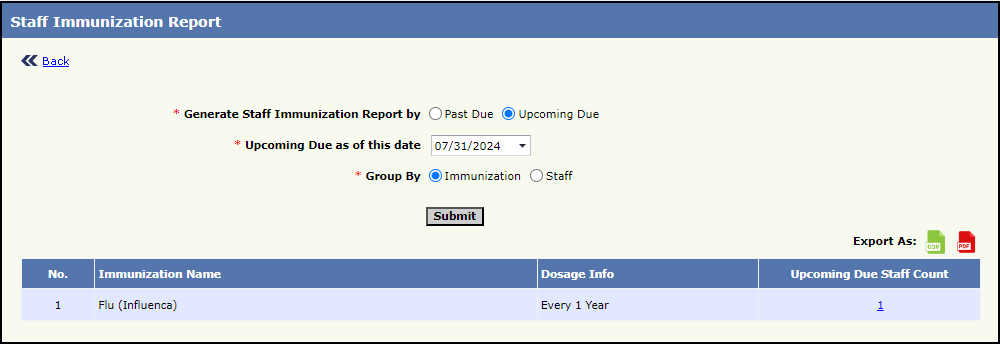
Figure 25 Staff Immunization Report with Upcoming due immunization list
- On clicking the Upcoming Due Staff count against an Immunization ( Figure 25), the staffs for whom the Immunization is upcoming as of the chosen date will be listed.(Figure 26)
- The details displayed in this report are the Immunization information, Assessment Date, Report type, Staff Name, Age, Phone Number, Email Address and the Upcoming Due with dose, date and days count. (Figure 26)
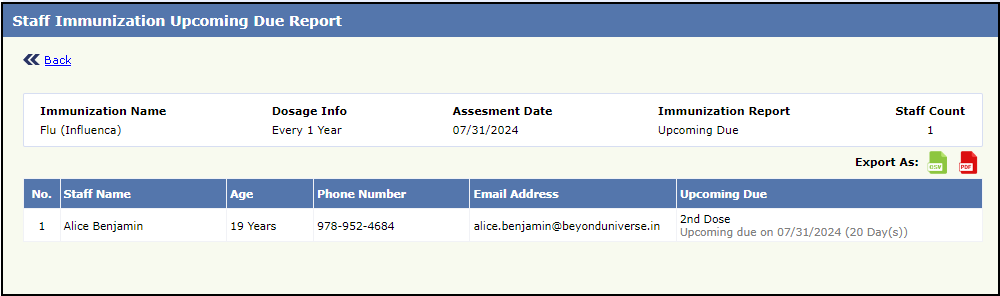
Figure 26 Staff Immunization Upcoming Due Report
ii. Group by Staff
- On choosing the ‘Upcoming Due’ option for Report Type, select the upcoming date and ‘Staff’ option under Group By, the Upcoming Due report, grouped by staff is generated.
- The Staff Name, Phone number, Email address, Immunization name and the upcoming due with dose number for every staff at the selected center along with the Upcoming date will be displayed. (Figure 27)
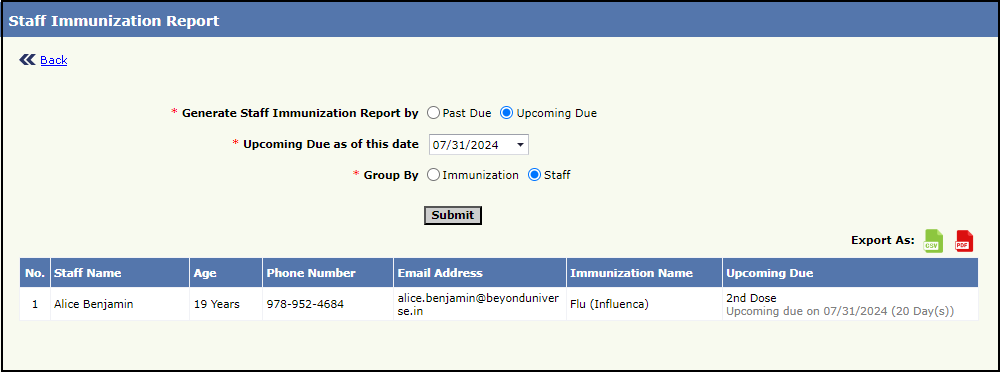
Figure 27 Staff Immunization Report with Upcoming due staff list
NOTE:
- Using the Export option,
 all these reports can be downloaded in PDF or CSV formats
 - In both Past Due and Upcoming Due reports, the missed or upcoming date along with the number of days count will be displayed from second dose onwards